Diamond Painting: Antistress
- 4.6
- Rating
- 100.00K
- Installs
- Free
- Price

 Analysis by App-foxy
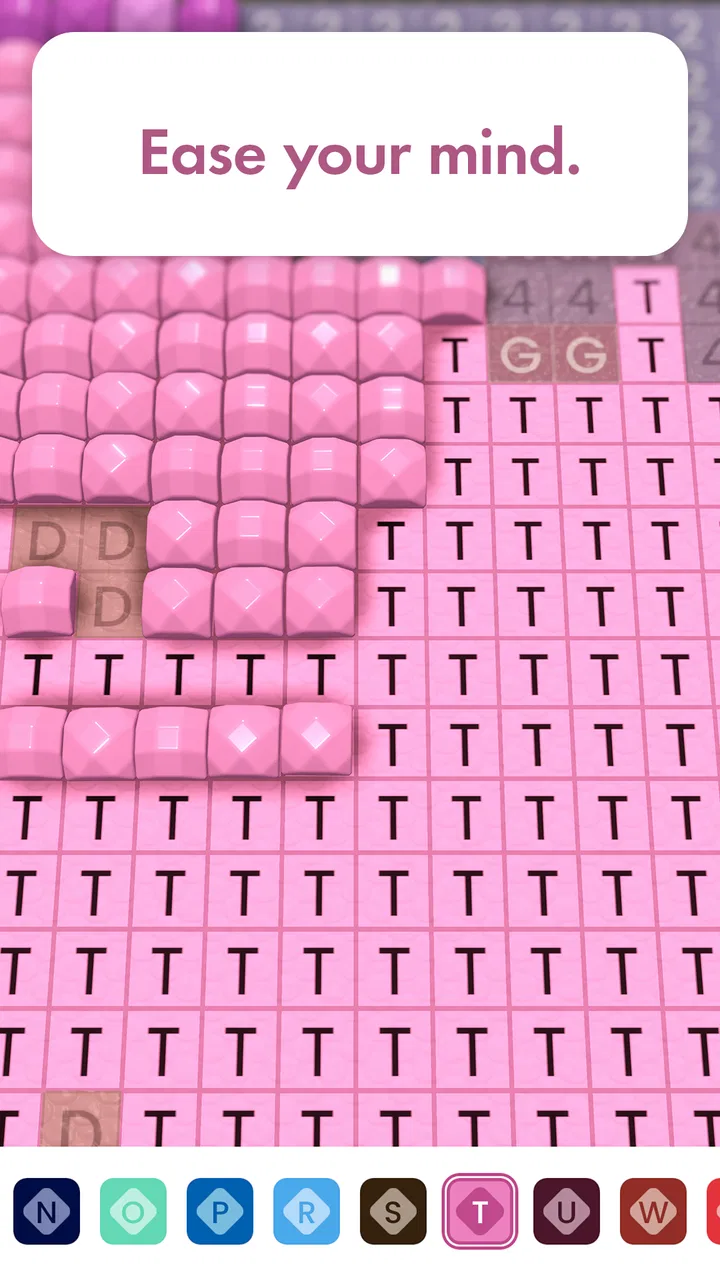
Diamond Painting: Antistress is the kind of board game I open when I want my attention occupied without having to think several moves ahead. Its basic idea is easy to understand: follow numbered color areas and gradually turn an unfinished picture into a diamond-style artwork. That familiar “one small task at a time” rhythm makes it approachable, especially when I want something calmer than a competitive puzzle or a fast arcade game.
What makes the experience worth discussing is not a complicated rule set, but the way its small goals, visible progress, and steady completion loop work together. I found myself judging it less as a traditional game and more as a guided creative activity with game-like pacing. That distinction matters. If you are looking for deep strategy, this will probably feel light. If you want a quiet activity for a short break, it has a much clearer purpose.
Created by Crimson Pine Games, this free board game has an Everyone age rating and a 4.6 average from around 1.2 thousand ratings. It has passed 100 thousand installs, which gives it a useful level of visibility without changing the personal nature of the experience. I tested it with the expectations I would have for a relaxing color-by-number app: simple controls, readable instructions, and enough progress feedback to make finishing a picture feel worthwhile.
You May Also Like

 Blood Strike: 2.5 Anniversary
Blood Strike’s Loadouts Turn Every Drop Into a Tactical Gamble
A close look at Blood Strike’s custom loadouts: how fast access to signature weapons reshapes its battle royale rhythm, rewards preparation, and narrows the gap between fights.

 Pandora - Music & Podcasts
Pandora’s Music Is Easy to Start, but Harder to Recover
Pandora’s strength is its low-effort path from a seed to a station. Its weak spot is how much confidence it asks you to place in connection, setup, and quiet recovery.

 8 Ball Pool
8 Ball Pool Is Built on Rivalries, Rematches, and Routine
A close look at the rivalries, rematches, shared routines, and unanswered safety questions that turn a quick pool match into a persistent mobile community.

 Samsung Music
Samsung Music’s Quiet Strength Is Playing What You Already Own
Its reach comes less from spectacle than from dependable access to a personal library. That simplicity is both the app’s strongest retention engine and its ceiling.

 AccuWeather: Weather Radar
AccuWeather Review: A Quick, Clear Forecast for Everyday Decisions
For everyday plans, the best forecast is the one you can understand quickly. AccuWeather makes rain timing, radar, and local conditions easy to act on, with a few trade-offs.

 Hill Climb Racing
Why Hill Climb Racing Still Turns Crashes Into One More Run
A tiny car, a bumpy hill and one more upgrade: Hill Climb Racing keeps resurfacing because its simple chaos makes every near-miss feel personal.
More From Our News Desk



How the first goals make the game easy to enter
The first goal is immediately understandable: choose a numbered section and fill it with the matching diamond color. I do not need to learn a board layout, memorize rules, or plan a long sequence. The game presents a small visual problem, and the answer is usually right in front of me. That low entry barrier is one of its strongest qualities.
Early progress comes from completing individual areas rather than chasing a score. Every filled patch changes the appearance of the image, so even a brief session produces a visible result. I like this because it gives the opening minutes a clear purpose. Instead of wondering whether I am playing correctly, I can see that the picture is becoming more complete.
The numbered structure also gives the activity a gentle sense of order. When several colors are available, I can work systematically through one shade or move toward whichever area catches my eye. That choice is small, but it keeps the process from feeling completely automatic. My preferred approach is to start with larger, easy-to-recognize sections, then use the remaining gaps as a cleanup task.
A useful habit is to avoid treating the image as one enormous job. I divide it mentally into small zones and finish one zone before moving elsewhere. This makes the session feel manageable and helps me notice missed spaces. It is especially helpful on a phone, where a wide image can otherwise become visually busy once many tiny numbered areas are visible.
The early goals are therefore effective because they are concrete rather than ambitious. The game does not need an elaborate tutorial to explain itself. A player who understands color by numbers can begin almost immediately, while someone unfamiliar with diamond painting can learn through the first image without feeling tested.
Why the visual feedback matters more than a score
The most satisfying feedback is the artwork itself. A completed section has more emotional weight than a simple counter because it contributes directly to the final picture. I notice this particularly when an image is still mostly unfinished: a few completed areas may look modest, but they establish a direction and make the next short session easier to start.
This is also where the game differs from many ordinary board titles. There is no need to beat another player or optimize a winning move. The reward is a cleaner, more colorful image. That makes the experience suitable for a quiet evening, a waiting room, or a short pause between chores, provided I am in the mood for repetition rather than competition.
Progress signals and the feeling of finishing something
Diamond Painting: Antistress communicates progress primarily through visual completion. I can tell where I have worked, which sections remain, and how close the artwork is to looking finished. These signals are simple, but they are important because a relaxing game still needs to answer one question: what should I do next?
For me, the best progress signal is the contrast between an incomplete area and one that has been filled. It creates a natural chain of small decisions. I select a color, locate its numbered spaces, place the matching pieces, and then reassess the picture. That loop is easy to repeat without demanding constant concentration.
There is a practical advantage to this format when my energy is low. I can stop after a small section and still feel that the session had an outcome. In a conventional board game, leaving halfway through may feel like abandoning a match. Here, partial completion is still meaningful because the artwork records the work I have done.
One of my more useful strategies is to alternate between visual satisfaction and efficient cleanup. I first complete a noticeable feature, such as a bright area or a central shape, because it makes the picture change quickly. After that, I scan for isolated spaces and less attractive leftover sections. This prevents the end of an artwork from becoming a frustrating hunt for tiny omissions.
The progress loop is not equally compelling for everyone. Players who need unlockable abilities, competitive rankings, or dramatic milestones may find the signals too quiet. The game’s appeal depends on accepting the finished image as the main reward. That is a fair trade, but it should be clear before downloading: the progress is tactile and visual, not a conventional character-development system.
What to expect from the pacing between sessions
The pacing works best when I treat each visit as a short creative break rather than a campaign that must be rushed. The game supports a stop-and-return style because the central task is easy to resume. I do not have to reconstruct a complicated plan after putting the phone down; I simply look at the remaining numbered spaces and continue.
That makes it a good companion for everyday moments. I might use it while waiting for an appointment, winding down before sleep, or taking a break from reading. I would not choose it when I want a strong narrative reason to continue, because the motivation comes from completing the current picture rather than discovering a story.
Another useful approach is to set a personal stopping point before beginning. I may decide to finish one color, one visual zone, or one recognizable part of the image. This keeps the relaxing quality intact and reduces the temptation to turn a calming activity into a completion chore. The game is more pleasant when I let the artwork guide the pace instead of trying to force a long session.
Difficulty: gentle concentration rather than demanding challenge
The difficulty curve is deliberately mild. The main challenge comes from locating the correct numbered spaces, distinguishing similar colors, and maintaining attention while working through repeated placements. It is not the kind of difficulty that asks me to solve a difficult puzzle; it is the kind that asks me to remain patient and accurate.
That distinction makes the game accessible, but it also creates its main limitation. If I am looking for escalating pressure, complex decisions, or a clear test of skill, the experience may not provide enough resistance. Its challenge is tied to visual detail and persistence, so the sense of accomplishment depends on how much I value careful completion.
I found that difficulty can rise naturally as an image becomes more detailed. A broad region is easy to understand, while a cluster of tiny spaces demands more deliberate checking. The game does not need to announce a harder stage for the task to become more absorbing; the artwork itself can create that change. Still, this is a soft increase, not a dramatic difficulty curve.
A concrete tip is to zoom and work in a controlled sweep rather than tapping randomly around the canvas. I move across a small area, finish what is visible, and then shift to the next one. This reduces the chance of overlooking isolated spaces and makes similar shades easier to compare. It also gives my eyes a stable reference instead of forcing them to jump around the whole picture.
Players with color-vision difficulties should think carefully about whether numbered guidance alone will be comfortable. The numbers provide structure, but the activity still relies on recognizing color differences. Someone who needs strong accessibility tools or high-contrast presentation may prefer a more specialized coloring option. For other players, the combination of numbers and visual placement should make the task approachable without turning it into a test.
Another trade-off concerns attention. The game can be calming because it narrows my focus, but the same repetition may become tiring after a long stretch. I get better results by alternating between detailed areas and broader sections. That keeps the activity from feeling like an endless search through nearly identical spaces.
Unlocks, retention pressure, and what keeps the loop moving
The strongest reason to return is the unfinished artwork. Each session leaves a visible invitation to continue, and that is enough for players who enjoy completion-based activities. I often feel a gentle pull to finish a section because the image looks noticeably better once the gaps are reduced.
At the same time, the retention pressure is relatively soft. The game does not need to rely on competition for its appeal, and its relaxing identity works better when returning feels like a choice rather than an obligation. I appreciate that kind of pacing, although players who expect frequent unlocks or a large progression ladder may want more substantial long-term structure.
Because the title is free, it is easy to try without an upfront purchase. There are in-app purchases ranging from $1.49 to $99.99 per item, so I would recommend checking the purchase flow carefully and setting device-level spending controls if children use the phone. The Everyone rating makes it broadly approachable, but an age rating does not remove the need for sensible purchase boundaries.
My advice is to judge the game by the free experience first rather than assuming that spending is necessary for enjoyment. If the basic act of filling numbered areas already feels satisfying, the app has done its job for you. If the core loop feels repetitive from the beginning, buying additional content would not solve that fundamental mismatch.
The current version is 1.53.0 and it requires an operating system version of 9 or later. That makes compatibility an important first check for anyone using an older device. On a supported phone or tablet, the larger screen can make detailed sections more comfortable, while a smaller display may encourage shorter sessions and more careful movement around the image.
Who will enjoy the long-term rhythm
I would recommend it to someone who likes coloring books, quiet puzzle activities, or visual completion tasks but does not want a timer. It is also a good fit for players who prefer progress they can see rather than progress represented only by points. The game can serve as a low-pressure reset after work because it gives the mind one narrow task without requiring a complicated commitment.
It is less suitable for someone who wants a traditional board-game experience with opponents, tactics, or changing rules. The board category describes its format, but the actual pleasure comes from diamond-style coloring. Likewise, players who need a strong story, character upgrades, or a constant stream of surprises may lose interest once the novelty of the first images fades.
For families, the Everyone rating makes the concept approachable, but I would still guide younger players around in-app purchases and help them understand that the numbered sections are the real task. For adults, the more realistic question is whether repetitive visual work feels soothing or tedious. There is no universal answer, and the app is honest in its appeal: it rewards patience more than reflexes.
My progression verdict after living with the format
Diamond Painting: Antistress succeeds when it keeps its promise of a calm, understandable activity. Its early goals are clear, its progress is visible, and its challenge grows mainly through detail rather than artificial pressure. I like that I can make meaningful progress in a short visit and return later without needing to remember a complicated system.
The trade-off is that the progression remains modest. The artwork supplies the motivation, so the experience may feel limited to players who want substantial unlocks, escalating objectives, or competitive stakes. I would choose a deeper puzzle game for mental challenge and a conventional board game for social play. I would choose this one when I want my hands and eyes occupied while keeping the rest of my attention relaxed.
Its free entry makes trying the loop straightforward, while the purchase range means I would approach optional spending deliberately. The developer, Crimson Pine Games, has positioned the game around a familiar activity rather than a demanding ruleset, and that focus is mostly a strength. It avoids unnecessary complexity, though it also means the long-term appeal depends heavily on how much I enjoy completing image after image.
My final recommendation is therefore specific: install it if you want a gentle color-by-number routine with visible progress and no need to compete. Start with short sessions, work in zones, and use the numbers as a checklist rather than rushing across the whole canvas. Skip it if your idea of a board game involves strategy, opponents, or dramatic progression. For the right player, the unfinished picture is the goal, the feedback, and the reason to come back.
Diamond Painting: Antistress is at its best as a small daily ritual, not as an all-purpose game. I found value in the quiet rhythm, the easy restart after a break, and the satisfaction of watching a detailed image take shape. Those qualities will not replace a challenging puzzle for everyone, but they make this a worthwhile free option for anyone seeking a focused, low-pressure creative pause.
FAQs for Diamond Painting: Antistress
01What is Diamond Painting: Antistress, and how does it work?
Diamond Painting: Antistress is a relaxing creative puzzle game based on the popular diamond-art hobby. You choose an image and fill numbered or colored sections with small sparkling pieces, usually called diamonds or gems. As each area is completed, the picture gradually comes to life. The simple tap-and-place controls make it easy to play, while the repetitive activity is designed to provide a calm, satisfying break.
02Is Diamond Painting: Antistress free to download and play?
The app can generally be downloaded for free, allowing you to try its basic painting activities without an initial purchase. However, free versions of this type of game may include advertising, optional in-app purchases, or premium content such as special pictures, tools, and extra collections. Before downloading, check the current store listing for pricing, subscriptions, and any restrictions that may apply to the version available on your device.
03Can children play Diamond Painting: Antistress safely?
The gameplay is simple enough for many children to understand, since it mainly involves selecting colors and tapping the correct areas. Nevertheless, parents should review the app’s age rating, advertising, privacy information, and in-app purchase settings before allowing independent use. Younger players may also benefit from supervision, especially if the game displays promotional offers or requires an internet connection for certain images or features.
04Does the game require an internet connection?
Some parts of Diamond Painting: Antistress may work offline after the necessary content has been loaded, which is useful when traveling or when you want to play without using mobile data. Other features, including advertisements, cloud saving, new picture collections, or account-related services, may require an internet connection. Because requirements can change with updates, it is best to test the specific version installed on your Android or iOS device.
05What are the main benefits and possible drawbacks of playing it?
The biggest benefit is its calm, accessible gameplay. Completing colorful images can feel rewarding, and the quiet, repetitive tapping may help you unwind for a few minutes. It does not demand fast reflexes or advanced skills, making it suitable for casual players. On the downside, repeated advertisements, locked artwork, limited variation, or optional purchases may reduce the experience for users who prefer completely unrestricted and distraction-free gameplay.
Pros
- Simple tap-to-color mechanics are easy to learn for beginners.
- Many designs offer a relaxing activity for short daily sessions.
- Completed artworks can be saved and shared with others.
- Helpful visual cues make matching colors straightforward.
- Suitable for casual play without requiring fast reactions.
Cons
- Some premium designs may require payment or watching advertisements.
- Large pictures can become repetitive during extended sessions.
- Small sections may be difficult to tap accurately on smaller screens.
- Progress may feel slow when completing highly detailed images.
- The relaxing gameplay offers limited variety beyond diamond placement.

Diamond Painting: Antistress
Gallery